 All articles
Learning
On Printing a Pocket Booklet

Sometimes I find it easier to read on paper, especially when I've already spent enough of the day looking at a screen. One thing I wanted when I built my personal reading pipeline was to turn material I would otherwise watch into something I could read on paper. A conversation with a language model gives me a different starting point. I get to choose the question, follow the parts that interest me, and make a small edition for one reader.
For the things I want to read on paper, I put together a mini-booklet skill. It arranges the pages of a document for a duplex printer. A single sheet of US Letter paper holds eight booklet pages when printed on both sides. Longer booklets use more sheets and fold to the same pocket size.
What the printer needs
The useful feature on a modern printer is automatic two-sided printing. The skill takes care of page order before the file reaches the printer. For an eight-page booklet, page eight sits beside page one because they become the back and front covers after folding. I lay out the text for the finished page, 4.25 by 5.5 inches. Shrinking a full-size document to fit can make an otherwise readable paragraph painfully small.
How one sheet becomes eight pages
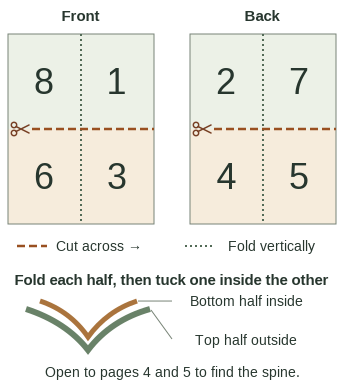
To make a copy from the prepared PDF:
- Choose portrait US Letter, actual size (100%), one PDF page per side, and long-edge duplex. Leave the printer's booklet and multiple-pages-per-side options off. The PDF already has four small pages on each side.
- Cut each sheet horizontally along the dashed line. Keep the top half before the bottom half, working through the sheets in order. Discard any completely blank half-sheet.
- Fold each half vertically and nest the halves with the first one outside. Check that the pages turn in order before fastening them.
Stapling through the fold
One folded half-sheet gives you four pages. For eight pages or more, nest all the folded pieces first. Open the booklet at its middle spread (pages 4 and 5 in the eight-page example), then turn it face down and flatten it. The front and back covers should now face you.
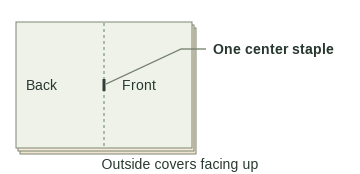
Many desktop staplers open flat for tacking. If yours does, swing the base all the way back and lay the booklet, covers up, on a piece of corrugated cardboard cut from a carton. Use enough layers for the staple legs to sink into. Place the stapler nose halfway along the fold, with the staple lined up along the crease, and press once.
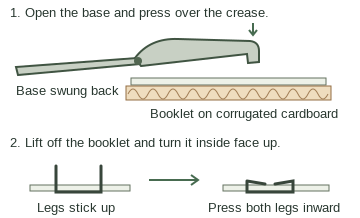
Lift the booklet gently off the cardboard and turn it over. The staple legs will stick up from the middle spread. Use the back of a spoon to press each leg inward until both lie flat, then close the booklet.
With a long-reach stapler, slide its metal anvil under the midpoint of the crease and press once. The anvil folds the legs for you.
A field guide or a reading companion
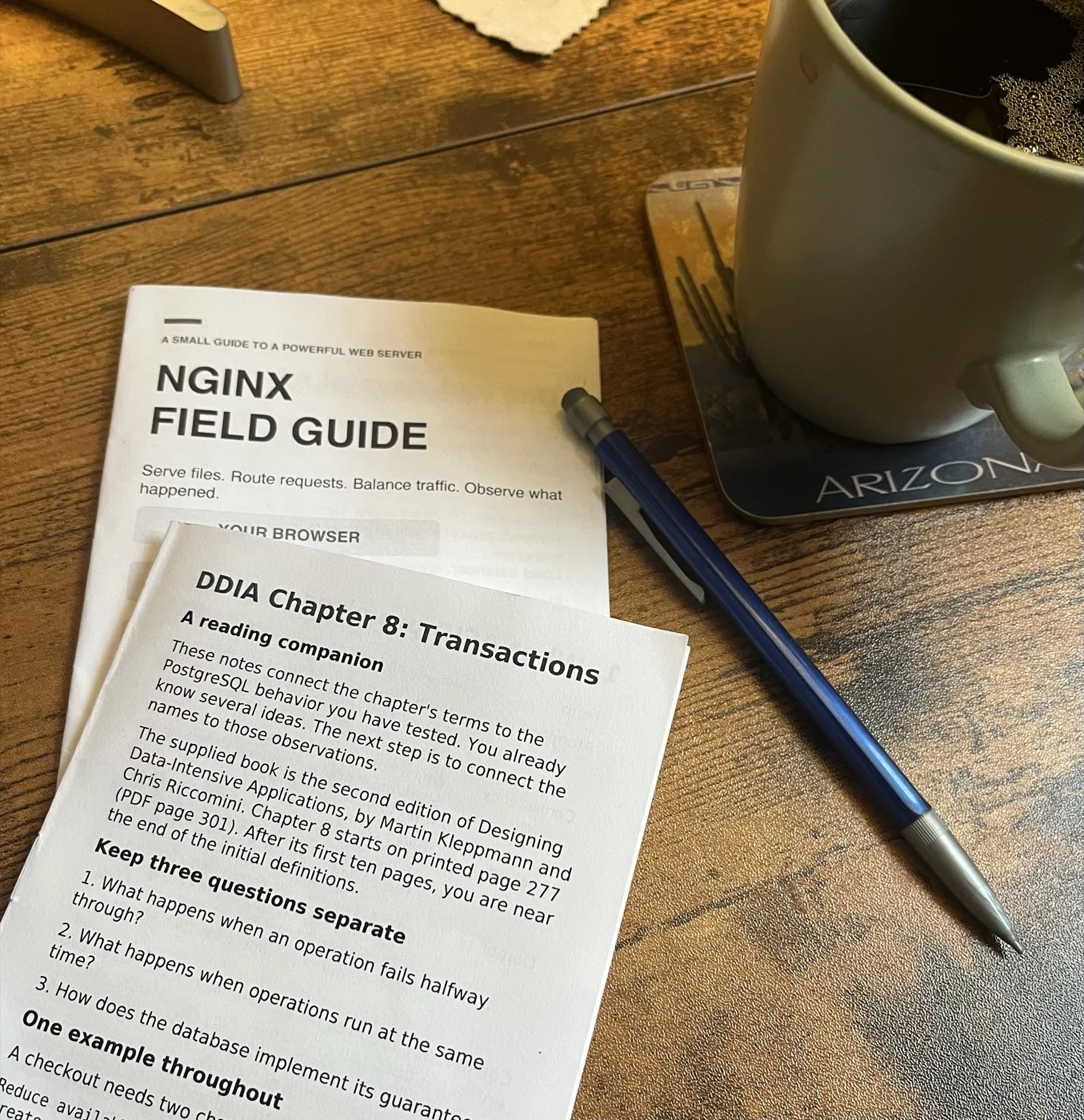
I use this format in a few different ways. For example, I leaf through my NGINX field guide when I need a reminder. A companion to Designing Data-Intensive Applications (DDIA) serves a different purpose. I can leave it open beside the book and keep my questions in view as I read.
When I ask an LLM to help make a booklet, I start with where I'll use it. A reference needs headings I can find at a glance. For a reading companion, a few good questions and room for my own notes may be enough.
I like the constraint of a single sheet. For the DDIA companion, I'd leave the last page for a worked example. I'd leave enough room to sketch what each transaction sees. That's something I'd want beside me when I open the chapter again.
 How the mini-booklet skill prepares the PDF
---
name: mini-booklet
description: Create a quarter-letter cut-and-fold Mini Booklet PDF, four pages per portrait Letter side, for duplex printing and center staples.
---

# Mini Booklet

## Print specification

Finished page: 4.25 x 5.5 inches. Portrait US Letter sheet: 8.5 x 11 inches. Four logical pages per side, two above and two below a horizontal center cut line. Duplex flips on the long edge. Both formats use a left spine, with pages turning from right to left. Pad logical pages to a multiple of four. An unused half-sheet may remain blank in Mini Booklet format.

## Workflow

1. Use the requested document. If it is not a PDF, create a sequential PDF first with the available document/PDF tools. Preserve content and keep a separate source. Do not impose an already-imposed PDF again.
2. Prefer laying out new content at the finished page size with readable type. Existing PDFs are scaled proportionally; report the resulting small type when relevant. The script reports the minimum scale (Letter source: 0.5 for Mini Booklet, about 0.647 for Booklet).
3. Run `scripts/impose.py INPUT.pdf OUTPUT.pdf` with a Python runtime containing `pypdf`; Mini Booklet also needs `reportlab`. Use bundled workspace dependencies when available. Paths in this command are placeholders, not fixed project paths. Save under the current project's `output/pdf/` unless the user chooses another destination. The script refuses to overwrite a file.
4. Check the printed page-order map, output page count, and sheet dimensions. Render the result to images and inspect every side for clipping, alignment, and readable text before delivery. An input with N pages requires ceil(N/4) physical sheets for Booklet or ceil(N/8) for Mini Booklet.
5. Deliver the new PDF with the print and assembly instructions below. Creating a PDF does not authorize sending it to a printer.

## Printing and assembly

Print at actual size / 100%, **one PDF page per sheet**, using portrait Letter and long-edge duplex. Page arrangement is already applied: disable extra booklet or N-up printing. Print all PDF sides, including sides with blanks. Driver settings can override PDF duplex preferences; state the required setting explicitly.

Cut horizontally on the dashed lines. Order the half-sheets by physical sheet number, top half before bottom half. Discard a wholly blank half-sheet. Nest in that order, first half outside. Fold vertically and staple through the center.

## Page-order invariant

For P logical pages padded to a multiple of four, half-sheet/sheet i (zero-based) has front `[P-2i, 1+2i]` and back `[2+2i, P-1-2i]`, left to right. Mini Booklet places two successive half-sheets in the top and bottom of one physical sheet; each half stays in the same row on its back. The final wholly unused half is blank.